# APT

About the command you just ran...

Unlike Windows, many Linux distros manages their software through **"Packages"**, and it's managed by a **"Package Manager"**. This is convenient for updating every application with ease (like before), and installing new software is easier than ever.

There are many Package Managers, Ubuntu uses APT ([Advanced Package Tool](https://en.wikipedia.org/wiki/APT_\(software\))).

These are the most common usages of APT:

<table><thead><tr><th width="291">Function</th><th>Command</th></tr></thead><tbody><tr><td>List installed packages</td><td><code>sudo apt list</code></td></tr><tr><td>Install packages</td><td><code>sudo apt install &#x3C;package></code></td></tr><tr><td>Get updates</td><td><code>sudo apt update</code></td></tr><tr><td>Install updates</td><td><code>sudo apt upgrade</code></td></tr><tr><td>Remove packages</td><td><code>sudo apt remove &#x3C;package></code></td></tr><tr><td>Remove all unused packages</td><td><code>sudo apt autoremove</code></td></tr></tbody></table>

## Let's install something!

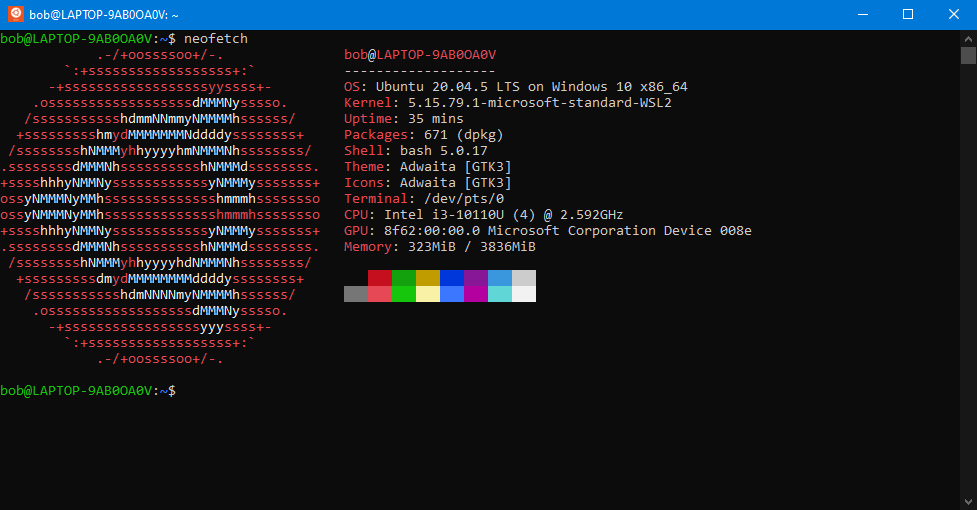
Neofetch is a simple program that shows information about the computer and the operating system.

You can install Neofetch using APT by running this command:

```
sudo apt install neofetch
```

Now you can run Neofetch, simply put `neofetch` in your terminal.

<figure><img src="https://1372910843-files.gitbook.io/~/files/v0/b/gitbook-x-prod.appspot.com/o/spaces%2Fj93R6i5LFt65ZuPhYR8e%2Fuploads%2Frga9pzcB5lZgGC5Fc2eJ%2Fimage.png?alt=media&#x26;token=4f860353-a289-4a14-9108-83352e212e55" alt=""><figcaption><p>Neofetch</p></figcaption></figure>

{% hint style="info" %}
Search other things to install. Try installing [`gcc`](#user-content-fn-1)[^1]!
{% endhint %}

&#x20;<mark style="background-color:green;">**👏 Congratulations!**</mark>**&#x20; You used APT to install software in Ubuntu.**

[^1]: GNU Compiler Collection

    [\[ Wikipedia \]](https://en.wikipedia.org/wiki/GNU_Compiler_Collection)
